Website Security Myth: Your Site Has Nothing Worth Stealing? Hackers Disagree.
WANT TO SEE MORE LIKE THIS?
Sign up to receive an alert for our latest articles on design and stuff that makes you go "Hmmm?"
Small business websites are valuable targets for hackers, even if they don't store sensitive data, because attackers are interested in the site's server, domain reputation, and visitors. Hackers commonly use compromised sites to host malware, create phishing pages, inject SEO spam, or send spam emails, turning the site into a tool for their illicit activities. Glantz Design, which has been building and hosting websites since 2008, notes that this assumption—that a site has nothing worth stealing—is one of the most expensive myths in business today.
Cybersecurity isn’t just a concern for banks, hospitals, and Fortune 500 companies. If your website is online, it is a target. It does not matter whether it sells products, stores customer data, or simply describes what your company does.
We hear it all the time from the CMOs and Presidents we work with: “Our site is basically a brochure. There’s nothing on it worth stealing.” It’s an understandable assumption, and it’s one of the most expensive myths in business today. Hackers rarely care about your content. They care about your server, your domain’s reputation, and your visitors. A quiet, text-only website that hasn’t been updated in months is exactly what they’re looking for.
We’ve been designing, building, and hosting websites for companies since Glantz Design was founded in 2008. In that time, many businesses have come to us after their website was hacked or was not properly maintained. We’ve rescued and remediated many of those sites, and almost every one belonged to an owner who thought they had nothing worth protecting. So let’s walk through why that thinking is reckless, what attackers actually do, and how to make cybersecurity a built-in part of how your website is managed.
Why Would Anyone Hack a Small Business Website With Nothing to Steal?
Most attacks aren’t personal. Automated bots scan millions of websites every day looking for one thing: outdated software with known weaknesses. When they find one, they don’t check what your company does. They simply move in and put your site to work. Here’s what they use it for:
Hosting malware: Your site becomes a delivery system that quietly infects visitors’ computers. Your prospects and clients become the victims, and your brand becomes the carrier.
Phishing pages: Attackers hide fake login screens for banks, Microsoft 365, or shipping companies deep inside legitimate websites. A trusted domain like yours makes their scam more convincing and harder to block.
SEO spam: Hackers inject hidden links and pages promoting pharmaceuticals, gambling, or counterfeit goods. They borrow your domain’s search authority to rank their junk, and your own rankings pay the price.
Malicious redirects: Visitors (sometimes only those coming from Google, so you never notice) get sent to scam sites, fake tech support pages, or worse.
Sending spam email: A compromised server can blast out thousands of spam or phishing emails. That can get your domain and server flagged, which affects the emails your own team send everyday.
Botnets and attacks on others: Your server’s processing power and bandwidth can be drafted into attacks on other websites, or used to mine cryptocurrency, slowing your site to a crawl.
A foothold for something bigger: Contact forms, admin accounts, and connected tools can give attackers a path to email addresses and passwords that are reused elsewhere, or other systems in your business.
In short, your website doesn’t need to hold sensitive data to be valuable. Its server, its reputation, and its traffic are the prize.
What Attackers Actually Do Once They’re In
A hack rarely announces itself. Many of these changes are designed to go unnoticed by the site owner for weeks or months. Here are real-world examples we’ve seen firsthand:
- They create hidden admin accounts. Attackers add their own administrator user, sometimes disguised with a name like “wp-support,” sometimes hidden from the Users page entirely, so they can return anytime, even after you change your password.
- They plant backdoors. Small snippets of code get tucked into plugin, theme, core files, or media uploads. Even if the original entry point is patched, the backdoor lets them walk right back in.
- They lock you out. Some attackers change admin emails and passwords, leaving you unable to access your own website.
- They flood your site with spam pages. In the well-known “Japanese keyword hack,” thousands of auto-generated pages selling counterfeit goods appear on your domain. You won’t see them in your navigation, but Google will.
- They hijack your search results. Your page titles and descriptions in Google suddenly show pharmaceutical or gambling ads instead of your services.
- They redirect only some visitors. Mobile users, or people arriving from Google, get bounced to scam sites while you, visiting directly from your office, see a perfectly normal website.
- They tamper with your forms. Contact and quote request forms can be altered to copy every submission to the attacker, quietly harvesting your prospects’ names, emails, and phone numbers.
- They change your contact details. A swapped phone number, email address, or payment instructions can send your clients’ calls, inquiries, or even payments straight to a criminal.
- They inject card skimmers. On sites that take payments, malicious scripts capture credit card numbers as customers type them.
- They deface the site. Less common today, but some attackers replace your homepage with their own message or political content.
- They hold it for ransom. Files or databases can be encrypted or deleted, with a demand for payment to get them back. Without clean, off-site backups, you may have no choice but to rebuild.
- They use you to attack others. Your server sends phishing emails, hosts fake login pages, or joins attacks on other websites, all under your domain name.
- They hide behind your server. Attackers route their traffic through compromised websites, often chaining several together across different countries, so their activity appears to come from your server instead of their own computer. When investigators trace an attack, the trail leads to your business first, while the real attacker’s identity and location stay hidden several hops away.
- They mine cryptocurrency on your dime. Malicious code injected into your site or server quietly uses its processing power to mine Bitcoin or other cryptocurrencies. Some versions even run in your visitors’ browsers while they’re on your pages. The signs are subtle: a sluggish website, maxed-out server resources, and unexplained hosting overage charges, while the attacker collects the profits.
How AI Is Speeding Up the Attackers
Artificial intelligence has changed the timeline for website security, and not in the defenders’ favor. Finding a software flaw and turning it into a working attack used to take skilled experts days or weeks. That delay gave site owners time to update. AI has largely erased this.
Microsoft’s 2026 Digital Defense Report warns that attackers are collecting the benefits of AI first, and that in many cases finding and weaponizing a vulnerability now comes down to simply writing a prompt. Recorded Future reports the average time for attackers to exploit a vulnerability fell from 72 hours last year to just 24 hours in 2026.
Here’s how AI helps bad actors:
- Reading the patch to find the hole. Every security update is also a roadmap. By comparing the old code to the new code, a technique called patch diffing, attackers can see exactly what was broken. AI now does this in minutes, then helps build a working exploit to use against every site that hasn’t updated yet.
- Attacking before the official fix even ships. Many projects, including WordPress plugins, make code changes publicly visible before an official release reaches site owners. In one 2026 test, an AI model produced a working exploit within an hour of a fix appearing in the code, while the official release containing that fix was still 18 days away.
- Finding brand-new flaws. AI can scan huge amounts of code looking for weaknesses no one has reported yet. These “zero-day” vulnerabilities can be exploited before the vendor realizes they exist, let alone issue security releases addressing them.
- Scanning the whole internet at once. Automated, AI-assisted tools sweep millions of websites looking for any site running a vulnerable plugin or theme version.
- Writing more convincing phishing. AI produces polished, personalized emails that trick people into handing over website, hosting, or email passwords.
A real 2026 example shows how fast this moves. In July, a researcher used AI to uncover a serious multi-step flaw in WordPress itself, nicknamed “wp2shell,” in about 10 hours of work. After WordPress released the fix, the first attack probes arrived the next morning, and mass exploitation was underway in under 48 hours. Sites that waited a week to update were left exposed.
The takeaway is simple: monthly updates and annual checkups were built for a slower era. Today, protection has to be continuous.
Why Ongoing WordPress Maintenance Isn’t Optional
A website isn’t a one-time project. It’s software, and software ages. Every plugin, theme, and line of server code on your site is a potential door, and new weaknesses in them are discovered every single week.
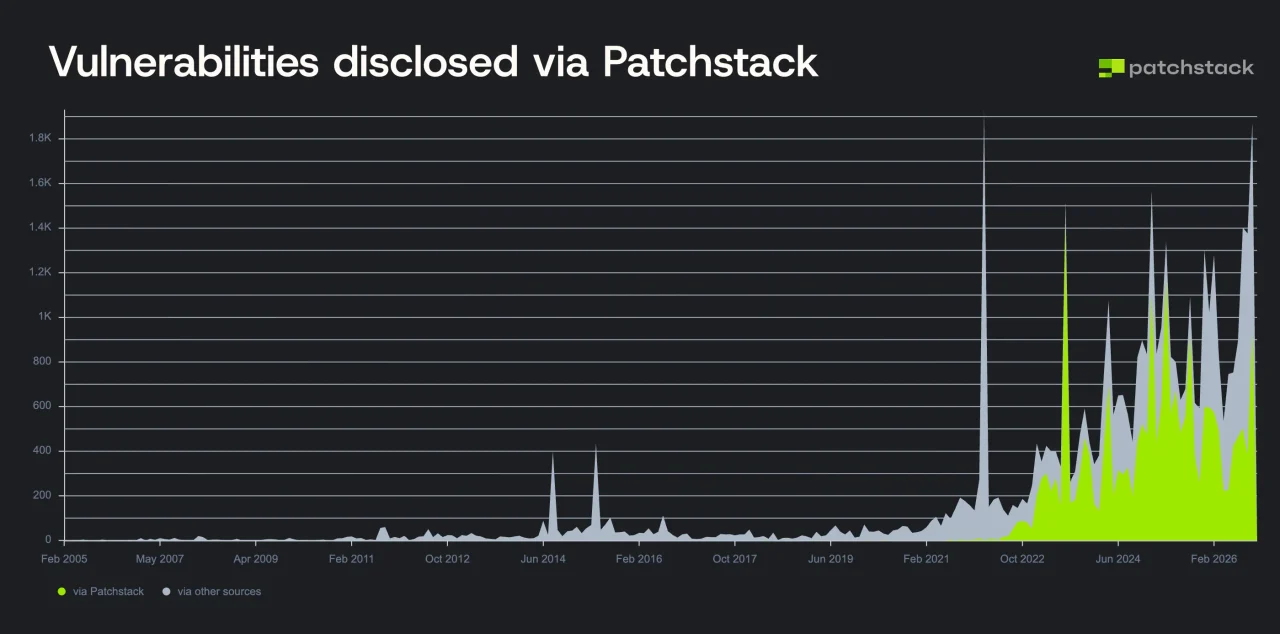
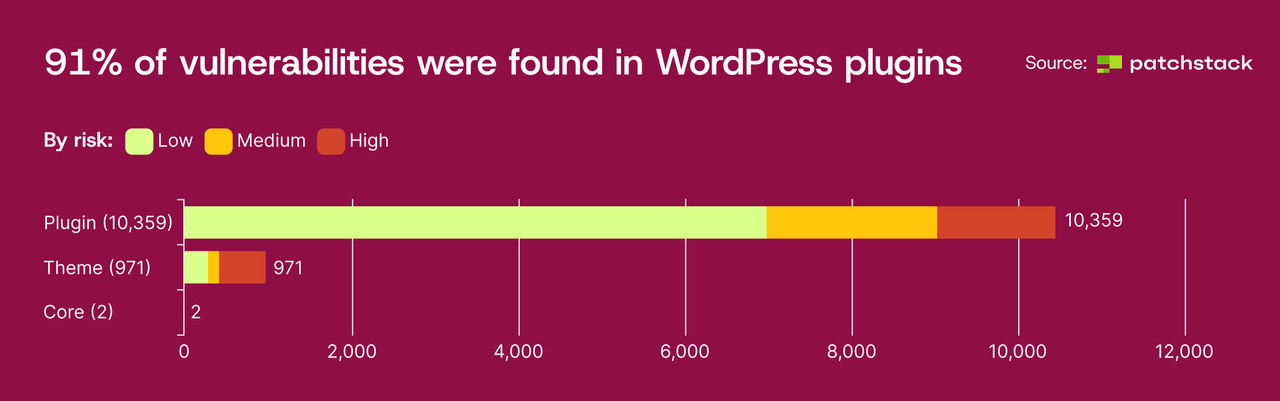
The numbers are sobering, and 2026 has been no exception. In a single week in January 2026, 333 new WordPress vulnerabilities were disclosed, roughly 48 a day. In August 2026 alone, one tracker logged 929 new WordPress vulnerabilities, 75 of them critical. Patchstack’s State of WordPress Security in 2026 report found that 91% of vulnerabilities live in plugins rather than WordPress itself, and that 46% did not have a fix available from the developer when they were made public.
Even WordPress core isn’t immune. In July 2026, a serious flaw in WordPress itself was patched, and Patchstack reported attacks beginning roughly 90 minutes after the fix was released.
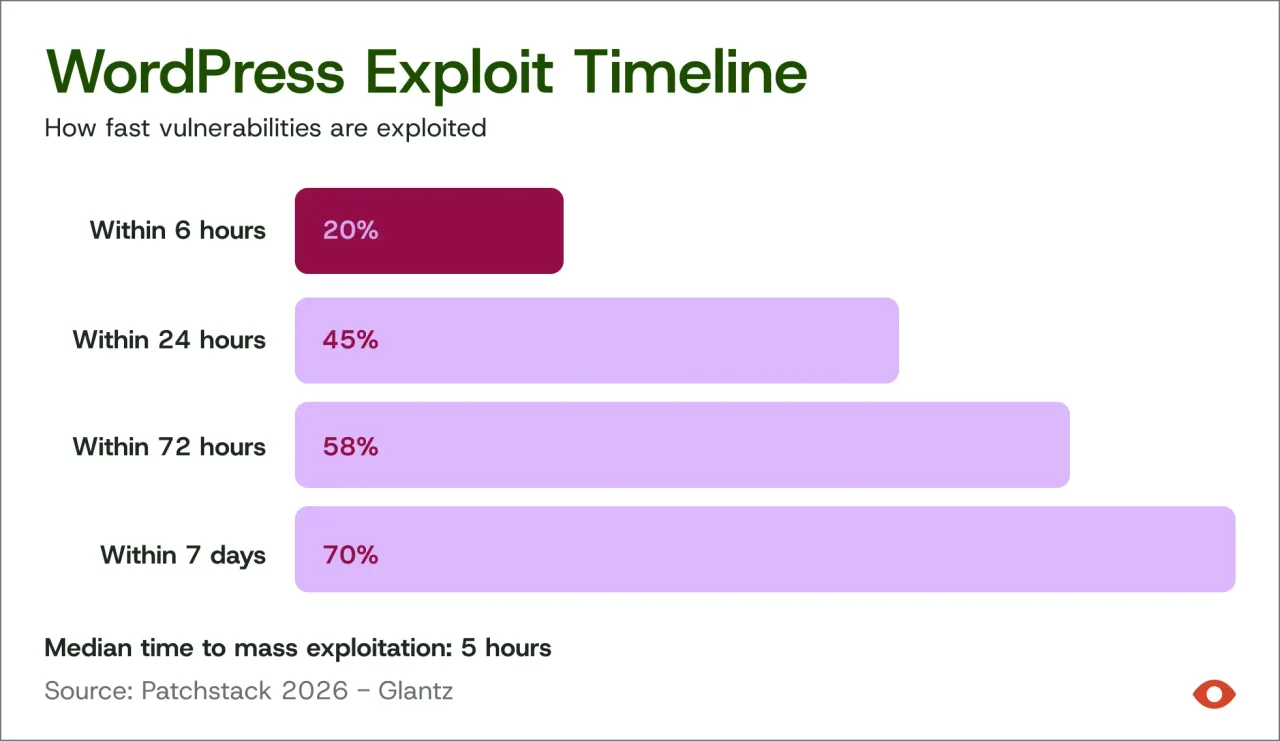
The moment a vulnerability is made public, bots start scanning for sites that haven’t fixed it. The window between disclosure and attack is often measured in hours, not months. That’s why a “set it and forget it” approach, or even a once-a-month update schedule, is no longer enough. We learned this firsthand: over the past year, our team shifted from monthly updates to patching our clients’ sites as new vulnerabilities appear.
What Other Website Security Risks Exist Beyond Plugins, Like the October 2026 PHP Emergency?
Beyond plugins, other website security risks include underlying server software like PHP, as demonstrated by the October 2026 PHP Emergency. This event highlighted that even with updated plugins, sites were vulnerable if the server's PHP version was not patched. WordPress is built on PHP, and new weaknesses in this programming language can be critical, allowing attackers to take control of a server without logging in. The PHP security team issued an urgent warning, leading to critical security releases to fix flaws that put millions of sites at risk. This emphasizes that comprehensive website care must include timely updates to the CMS, plugins, themes, and the server's underlying software, along with other measures like web application firewalls, malware scanning, blacklist monitoring, reliable backups, and strong access controls.
On October 20, 2026, the PHP security team issued an unusual warning: a critical security release was coming the next day, and everyone should prepare to update immediately. On October 21, PHP released versions 8.5.12, 8.4.27, 8.3.36, and 8.2.35 to fix two critical flaws, each rated 9.2 out of 10, that could let an attacker take control of a server without logging in at all. Within days, proof-of-concept attack code was already circulating, and PHP disclosed a third related vulnerability on October 23.
The scale was enormous. The flaws, nicknamed “PHP2Shell,” were estimated to put roughly 70% of websites at risk, millions of sites in all.
A few lessons stand out for business owners:
- Your plugins being up to date wasn’t enough. WordPress confirmed no WordPress update was needed. The fix had to happen on the server itself. Fully up-to-date sites were still exposed if no one updated PHP.
- Old versions get left behind. The PHP project only provides official updates for PHP 8.2 and newer. Sites still running PHP 8.1 or older, which is common on neglected websites, are at the mercy of their host or third-party patches.
- Speed was everything. Responsible hosts applied temporary mitigations the night before the release and installed the fixed versions as soon as they were available.
For our hosted clients, we worked alongside our hosting partner WP Engine to patch every server we manage quickly, with no action required on our clients’ part. This is exactly why website care has to include the server, not just the site.
Responsible website care today includes:
- Timely updates to the CMS, plugins, and themes as security patches are released, not on a fixed calendar
- Replacing abandoned plugins that no longer receive security fixes
- A web application firewall that blocks known attack patterns before they reach your site
- Malware scanning to catch infections early, before Google or your visitors do
- Blacklist monitoring so problems are flagged and fixed fast
- Reliable, off-site backups so a clean version can be restored quickly
- Strong access controls, including unique passwords, two-factor authentication, and removing old user accounts
Audit Who Has Access to Your Site
One of the simplest and most overlooked security steps is reviewing who can actually log in. Over the years, websites collect accounts like a junk drawer: former employees, past agencies, freelancers who handled one project, and plugin vendors who needed temporary access for support. Every one of those accounts is a potential way in, especially if its password was weak or reused elsewhere.
A good user audit looks at:
- Every account on the site. Remove anyone who no longer needs access, and disable accounts the day someone leaves your company or ends an engagement.
- Unfamiliar names. An administrator account nobody recognizes is a red flag that your site may already be compromised.
- Permission levels. Most people don’t need to be Administrators. Someone who only publishes blog posts should be an Editor or Author. The fewer admin accounts, the smaller the target.
- Shared logins. Each person should have their own account, so activity can be tracked and access can be removed individually.
- Two-factor authentication. Require it for every account with admin-level access.
- Recent login activity. Logging tools like Apocalypse Meow show who has signed in, when, and from where, making unusual activity easy to spot.
- Access beyond WordPress. Don’t forget hosting control panels, FTP or SFTP accounts, databases, your domain registrar, DNS, and Google Search Console. These are the keys to the whole house.
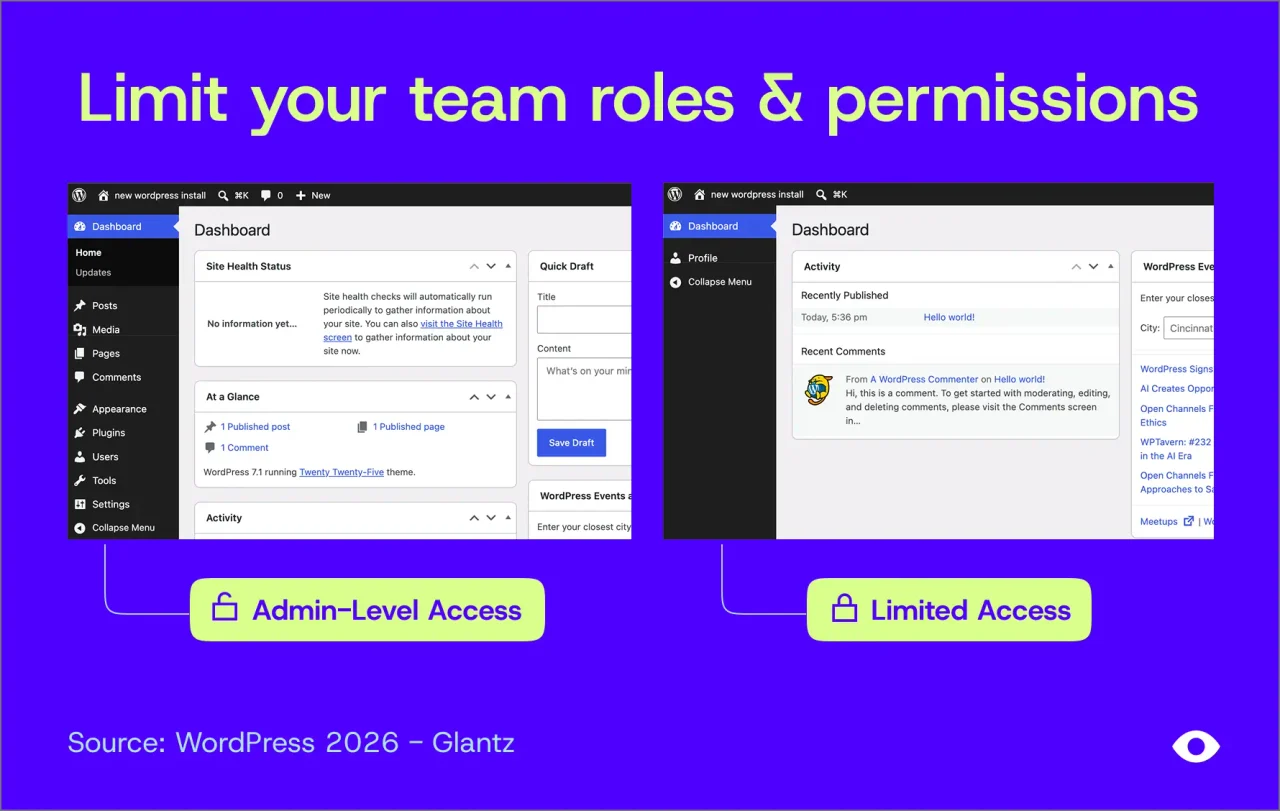
We recommend a full access review at least quarterly, and immediately whenever a team member or vendor relationship changes.
This is ongoing, hands-on work. It’s also far less expensive than cleaning up after an attack.
What Happens If Your Website Is Hacked or Blacklisted by Google
When a site is compromised, the damage rarely stays contained to the website. Here’s what businesses typically face.
Google blacklisting: If Google’s Safe Browsing system detects malware or phishing on your site, Chrome, Firefox, and Safari users see a full-page red warning telling them the site is dangerous. Almost nobody clicks past it. Blacklisted sites commonly lose around 95% of their organic traffic.
Lost leads and revenue: For a B2B company, your website is often the first impression a prospect has. If that impression is a security warning, the opportunity is gone, and you may never know it existed.
Damaged reputation and trust: Clients and partners who see a warning, or who receive spam from your domain, start to question how you handle security elsewhere. For firms that sell expertise and reliability, that hit can outlast the hack itself.
Email deliverability problems: This is one of the most overlooked and frustrating side effects of a hack, because it hits your whole team, not just your website.
Here’s how it happens: Once malware is on your server, attackers often use it to send thousands of spam or phishing emails. Email providers like Gmail and Microsoft notice the flood and report it to blocklist services such as Spamhaus, Barracuda, and SpamCop. Your server’s IP address, and sometimes your domain name itself, gets listed as a known source of spam.
Spam isn’t actually required to cause delivery problems. Website and email blocklists are increasingly intertwined, so mail servers are likely to block or filter messages from any domain flagged for malware, even if your server never sent a single spam email. A malware infection on your website alone can be enough to put your company’s email at risk.
From there, the damage spreads:
- Your everyday email gets filtered. Proposals, invoices, and replies to clients start landing in junk folders or bouncing back entirely. Often nobody tells you. Clients simply stop hearing from you.
- It can happen even if your email is hosted elsewhere. Many businesses use Google Workspace or Microsoft 365, so they assume a website hack can’t touch their email. But if your domain is flagged, any message containing a link to your website, including the one in your email signature, can be treated as suspicious.
- Your domain can be used to impersonate you. Phishing emails sent from your server, or spoofed to look like they came from your company, can reach your own clients and partners. That’s a serious trust problem, and it can trigger complaints that drag your reputation down further.
- Website forms stop delivering. Contact and quote request notifications sent from your site may never arrive, so new leads disappear without a trace.
Recovery isn’t instant. After the malware is removed, each blocklist has its own delisting process, and email providers rebuild trust in a domain gradually. It can take days or weeks for your messages to reliably reach inboxes again. Proper email authentication records (SPF, DKIM, and DMARC) and ongoing blacklist monitoring help prevent this and shorten recovery when something does go wrong.
SEO setbacks: Spam pages and hidden links can tank your search rankings. Even after cleanup, recovering lost rankings can take months.
Cleanup costs and downtime: Professional malware removal, forensic review, rebuilding compromised sites, and requesting blacklist reviews all take time and money. While it happens, your site may need to be taken offline.
Legal and compliance exposure: If visitor information from forms is exposed, or your site is used to harm others, you may face notification obligations, client contract issues, or questions on security questionnaires from your own customers.
WordPress Security Tools Worth Knowing About
You don’t have to be a developer to keep an eye on your website’s health. These are tools our team relies on for the WordPress sites we host and manage, and several are free for anyone to use.
Patchstack: Stop Vulnerabilities Before They’re Exploited
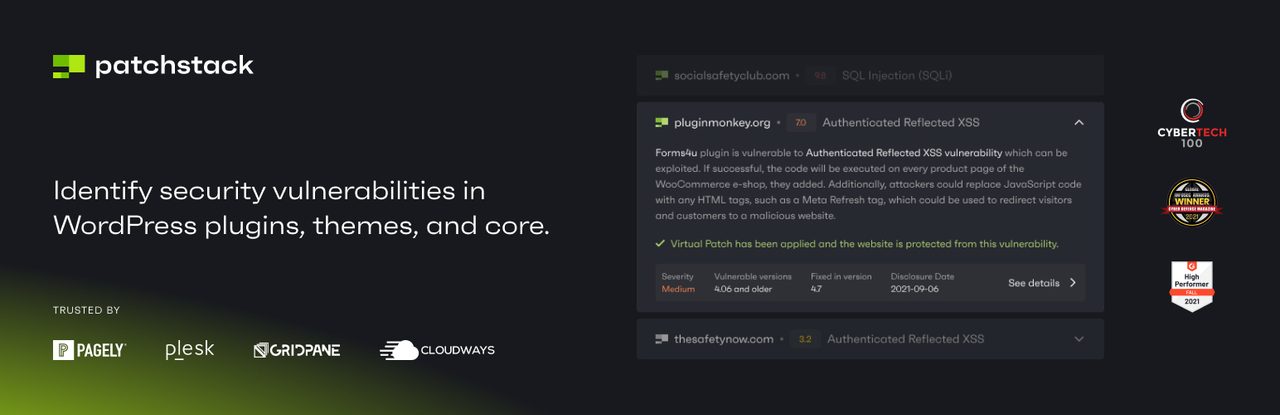
Most WordPress security tools focus on cleaning up after an infection. Our smart people stand by Patchstack’s technology as it focuses on preventing one in the first place. It matches the plugins, themes, and WordPress version on your site against its vulnerability database and alerts you when something you’re running has a known weakness.
Key benefits:
- Early warning. Patchstack works with a large community of security researchers and close to a thousand plugin vendors, so it’s often among the first to learn about new vulnerabilities. Even the free version can flag issues up to 48 hours early.
- Virtual patching. On paid plans, Patchstack deploys targeted firewall rules that block attacks on a specific vulnerability, even before the plugin developer releases a fix. That matters when so many plugin flaws go unpatched.
- Lightweight protection. Rules are applied only when a site actually needs them, with minimal impact on performance.
- Built for agencies. A central dashboard, alerts, and security reports make it practical to manage many sites at once.
Wordfence Security
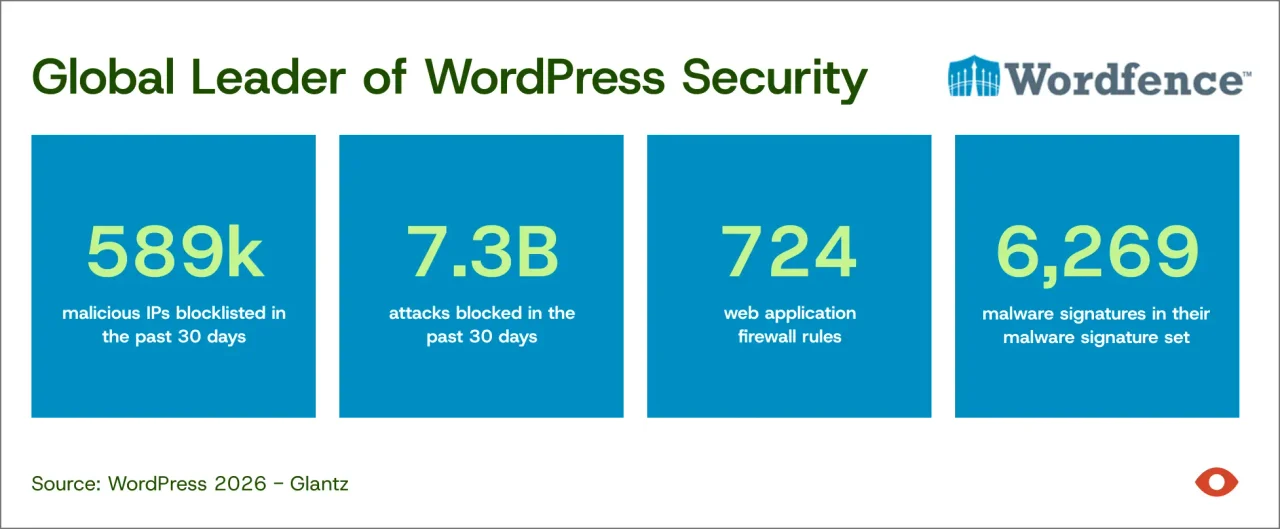
Wordfence offers a comprehensive web application firewall like Patchstack, but it also provides scheduled and on-demand file scanning to help identify malicious code that might already have been planted on a site.
This plugin demands more server resources than Patchstack and won’t be an option for everyone, but can be a valuable resource when debugging and cleaning up a hacked site.
Apocalypse Meow: Login Protection and Activity Logging
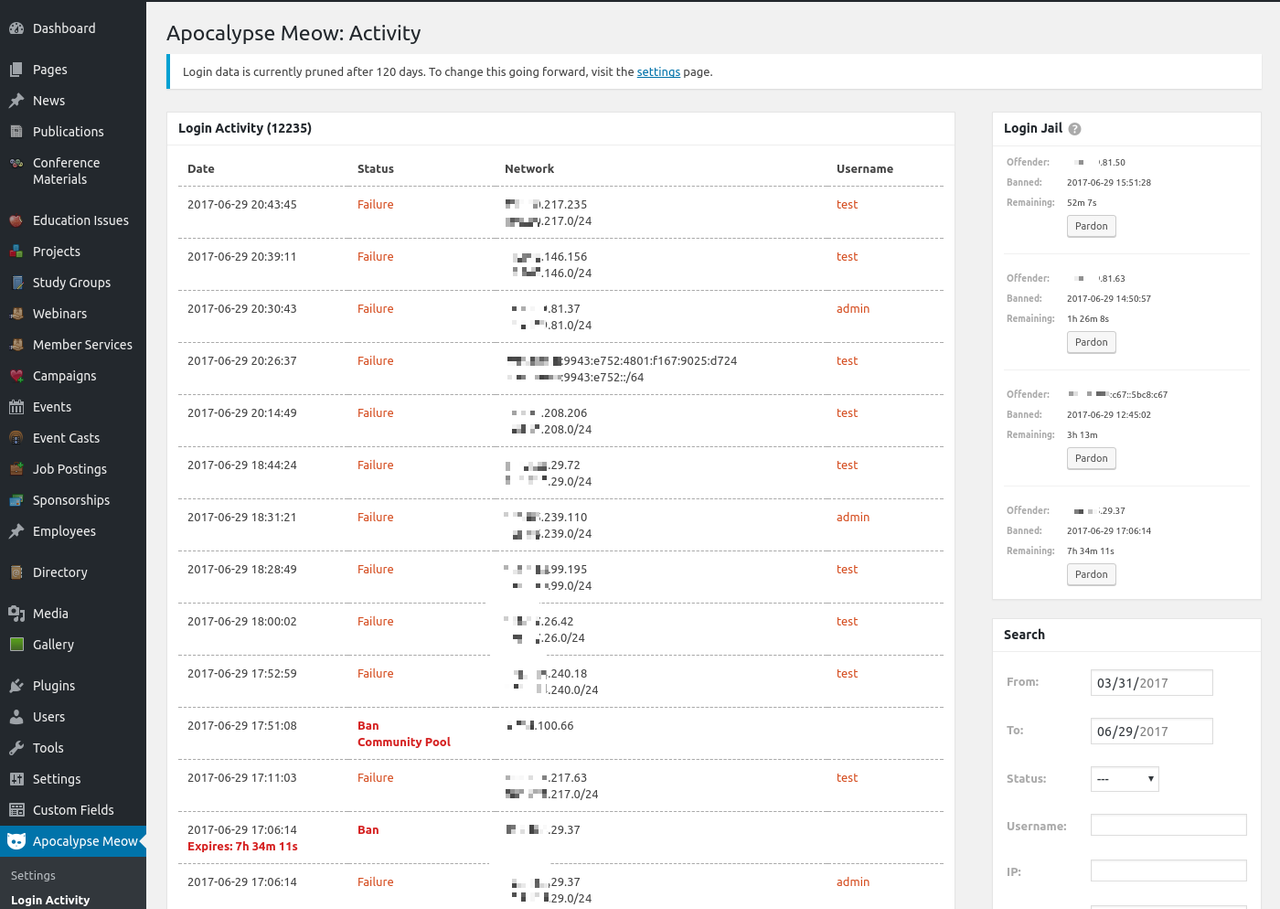
Stolen or guessed passwords are one of the most common ways into a WordPress site. Apocalypse Meow is a lightweight plugin focused squarely on user accounts and logins. It provides brute-force login protection, enforceable password strength rules, XML-RPC controls, account access alerts, and blocks many of the user enumeration tricks bots use to discover usernames in the first place.
Its searchable access log is especially useful. It records every login attempt, successful or failed, along with temporary bans, so you can see exactly who is knocking on the door. Only usernames and IP addresses are stored, never attempted passwords.
SecurityHeaders.com: Check Your Server Configuration
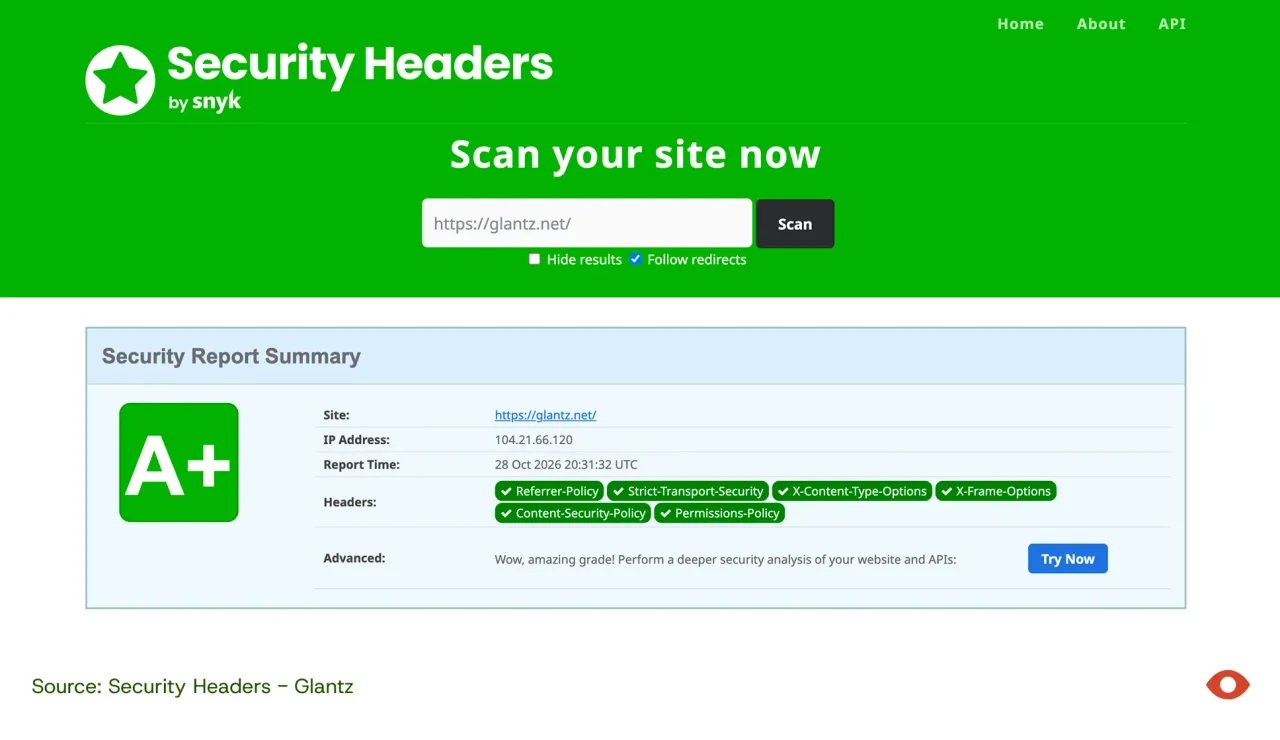
SecurityHeaders.com scans your site and grades its HTTP security headers from A+ to F. These headers are instructions your server sends to browsers that help prevent attacks like clickjacking, cross-site scripting, and content injection. It takes seconds, it’s free, and a low grade is an easy signal that your server needs attention.
VirusTotal: A Second Opinion From 90+ Scanners
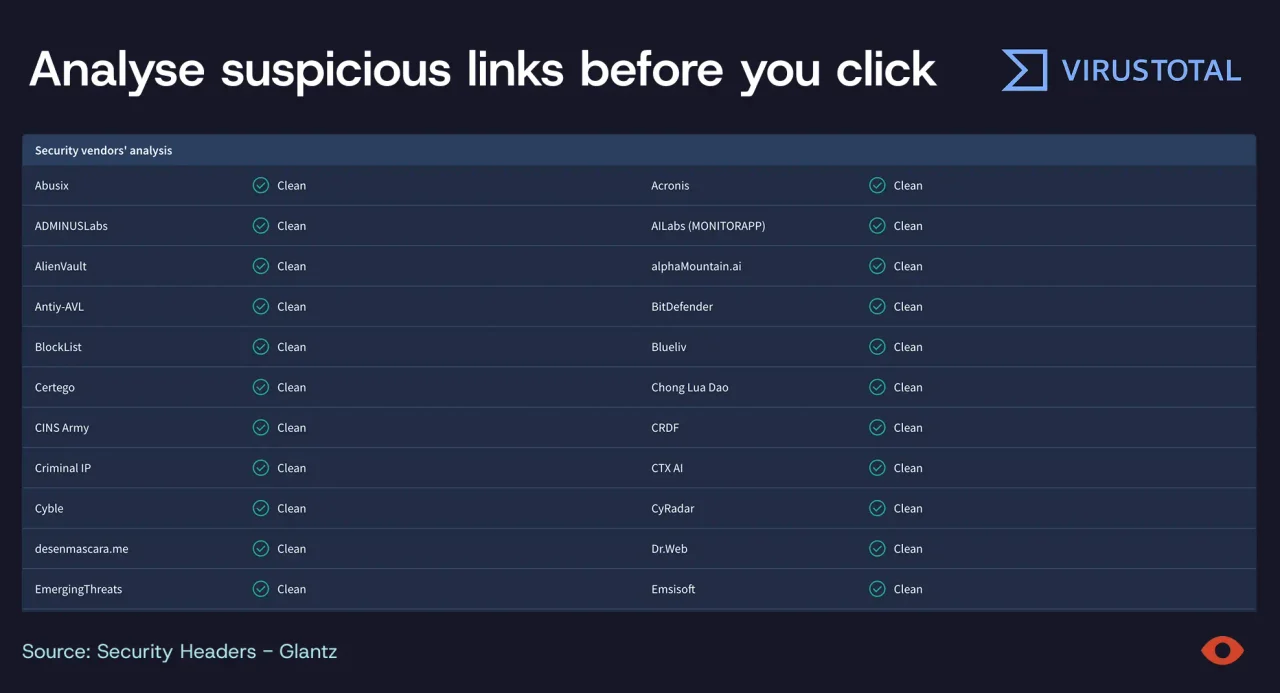
VirusTotal checks a URL against dozens of antivirus engines and blocklist services at once. It’s a fast way to see whether any security vendors have flagged your domain, and a handy habit for checking suspicious links in emails before you click them. It’s free for non-commercial use.
Google’s Free Tools
- Safe Browsing Site Status lets you enter any URL and see whether Google currently considers it dangerous. This is the same system behind those red browser warnings.
- Google Search Console is the most important free tool a site owner can set up. Its Security Issues report alerts you if Google detects hacked content, malware, or phishing on your site, and it’s where you request a review once a problem is fixed.
- Password Checkup, built into Google Password Manager and Chrome, warns you when a saved password has been exposed in a known data breach or is reused across sites.
Password Managers
Weak and reused passwords undo every other safeguard on this list. A password manager generates a unique, strong password for every account and remembers it for you. We use these tools because it allows for more complicated passwords without having to remember any of them. Solid options include:
- Built for teams: 1Password, Bitwarden, Dashlane, Keeper, and NordPass all offer business plans with secure password sharing and admin controls, making it easy to remove access when someone leaves.
- Privacy-focused: Proton Pass, from the makers of Proton Mail.
- Built-in and free: Google Password Manager for Chrome and Android users, Apple Passwords for iPhone and Mac users, and Microsoft’s password manager in Edge and Authenticator for Microsoft 365 shops.
Pair a password manager with two-factor authentication on your website admin, hosting, and domain registrar accounts, and you’ve closed one of the most common doors attackers use.
Why Professional Website Maintenance Is Worth It
No one can honestly promise a website will never be breached. If they do, they are lying. New vulnerabilities appear daily, and some are exploited before a fix even exists. But staying on top of updates, monitoring, and access controls dramatically reduces the likelihood of a breach, and it means that when something does slip through, it gets caught and fixed quickly instead of quietly doing damage for months.
That level of vigilance is hard to sustain on your own. Here’s what a professional maintenance partner brings:
- Speed. When attackers move within hours of a disclosure, someone needs to be watching and ready to act the same day, not when an internal team finds time.
- Expertise across the whole stack. Plugins, themes, WordPress core, PHP, the server, firewalls, DNS, and even email authentication all need attention. As the most recent PHP emergency showed, keeping plugins current isn’t enough on its own.
- Safe updates. Updates occasionally conflict with each other and can break a site. A professional tests changes, keeps backups ready, and knows how to roll back fast.
- Continuous monitoring. Firewalls, malware scanning, blacklist monitoring, and login logs catch problems early, often before Google or your clients ever notice.
- A secure hosting foundation. Maintenance works best on solid ground. WP Engine, one of our preferred hosting partners, is a managed WordPress host focused on performance and security. Just as important, they offer excellent customer service. If something does go wrong, we want a partner we know we can rely on and trust.
- Lower total cost. Ongoing maintenance costs far less than emergency malware cleanup, lost leads, a damaged reputation, and weeks spent recovering search rankings and email deliverability.
Think of website maintenance the way you think of insurance or servicing your car. It isn’t a one-time expense you can check off. It’s what protects the investment you’ve already made in your brand, your website, and the trust your clients place in you. Stopping maintenance doesn’t save money. It just moves the cost to the day something goes wrong.
Protecting Your Website Is Protecting Your Brand
Your website works for your brand around the clock. Keeping it secure is part of keeping your brand strong. The question isn’t whether bots will probe your site. They already are. The question is whether they’ll find an open door.
At Glantz, we help companies build brands they’re proud of, and a hacked website can undo that work overnight. That’s why we don’t just build websites. We host, monitor, and maintain them, with proactive updates, firewall protection, malware scanning, and blacklist monitoring built in. If you’re not sure when your site was last updated, or who’s watching it, let’s talk.
Frequently Asked Questions About Website Security and Maintenance
Most attacks are automated, not personal. Bots look for outdated software, not valuable data. Once inside, attackers use your server to host malware and phishing pages, send spam, boost their own search rankings, mine cryptocurrency, or hide their identity while attacking others.
Common warning signs include a sudden drop in traffic, browser or Google warnings, unfamiliar admin users, strange pages or links in Google search results, redirects to other sites, a slow server, and emails bouncing or landing in spam. Google Search Console’s Security Issues report and Google’s Safe Browsing Site Status tool are good first checks.
Security updates should be applied as soon as they’re released, not on a fixed schedule. In 2026, attackers often exploit new vulnerabilities within 24 to 48 hours of a fix becoming public. Routine, non-security updates can follow a regular schedule after testing.
Yes, when it’s properly maintained. WordPress core itself is well-secured. Most problems come from outdated plugins and themes, weak passwords, too many admin accounts, and unmaintained hosting servers.
Good website maintenance includes timely core, plugin, and theme updates, server and PHP updates, a web application firewall, malware scanning, blacklist monitoring, off-site backups, uptime monitoring, and regular user access audits.
Visitors using Chrome, Firefox, and Safari see a full-page red warning telling them your site is dangerous, and your pages may disappear from search results. Blacklisted sites commonly lose around 95% of their organic traffic until the problem is fixed.
Yes. A compromised server is often used to send spam, which can land your server or domain on email blocklists. Your team’s emails may then go to junk folders or bounce, even if your email is hosted separately on Google Workspace or Microsoft 365.
A web application firewall adds an important layer that a plugin alone may not provide. It blocks malicious traffic before it reaches your website, and services with virtual patching can block attacks on known vulnerabilities before an official fix is available.
AI helps attackers find vulnerabilities faster, turn security patches into working attacks within hours, scan millions of websites at once, and write more convincing phishing emails. That shrinking window is why continuous monitoring and fast updates now matter more than ever.
Sources
- State of WordPress Security in 2026, Patchstack
- 35+ WordPress Hacking Statistics (2026), Colorlib
- WordPress Vulnerability Roundup: August 2026, WP Vanguard
- WordPress Vulnerabilities: Latest CVEs, Exploits, and Security Risks in 2026, Penligent
- AI is giving attackers a head start, Microsoft warns, Help Net Security
- AI finding twice as many cyber flaws in 2026 as it did in 2025, The Star
- AI Can Now Weaponize a Security Patch in Under an Hour, How2Shout
- Hackers are mass-exploiting two WordPress flaws, and AI found the way in, The Next Web
- wp2shell in the Wild: From Patch to Mass Exploitation in Under 48 Hours, ELLIO
- Upcoming Critical PHP Security Release, PHP.net
- Critical Vulnerabilities in PHP, Security Advisory 2026-018, CERT-EU
- PHP Security Release on 21 October 2026: What WordPress Site Owners Need to Do, Codeable
- PHP2Shell: Critical Vulnerabilities in PHP, Endor Labs
- Website Blacklists, NOC.org
- What Is Google Blacklist?, Sucuri